
3.6 KiB
Quickstart

▶️ It only takes about 5 minutes to get up and running with ArchiveBox.
ArchiveBox officially supports macOS and Ubuntu on amd64 or arm64, plus Docker on those architectures. Windows is supported only through Docker Desktop or Docker in WSL2.
For more detailed Docker and Docker Compose-specific instructions, see the Docker page.
1. Set up ArchiveBox
Follow the README Instructions for your platform to get archivebox set up.
2. Get your list of URLs to archive
Follow the links here to find instructions for exporting a list of URLs from each service.
- Pinboard
- Instapaper
- Reddit Saved Posts
- Shaarli
- Unmark.it
- Wallabag
- Chrome Bookmarks
- Firefox Bookmarks
- Safari Bookmarks
- Opera Bookmarks
- Internet Explorer Bookmarks
- Chrome History:
bash ./bin/export_browser_history.sh --chrome - Firefox History:
bash ./bin/export_browser_history.sh --firefox - Safari History:
bash ./bin/export_browser_history.sh --safari - Other File or URL: (e.g. RSS feed url, text file path) pass as second argument in the next step
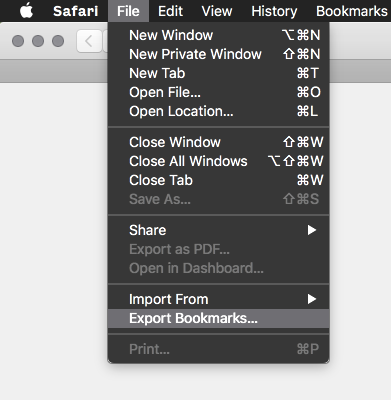
(If any of these links are broken, please submit an issue and I'll fix it)
3. Add your URLs to the archive
Pass in URLs directly, import a list of links from a file, or import from a feed URL. All via stdin:
archivebox add < your_urls.txt

# or if using plain Docker
docker run -v $PWD:/data -i archivebox/archivebox:dev add < your_urls.txt

# or if using Docker Compose
docker compose run --rm -T archivebox add < your_urls.txt

# any text containing URLs can ingested via stdin or as args
curl -fsSL 'https://getpocket.com/users/YOURUSERNAME/feed/all' | archivebox add
archivebox add 'https://example.com'
✅ Done!
Open ./archive to view your archive data in the filesystem.
You can also use the interactive Web UI to view/manage/add links to your archive:
# with plain Docker:
docker run -v $PWD:/data -it -p 8000:8000 archivebox/archivebox:dev

# with Docker Compose:
docker compose up -d

# or without Docker:
archivebox server

# Visit http://web.archivebox.localhost:8000 in a browser
Next Steps:
archivebox help # see info about all the available commands
- Read Usage to learn about the various CLI and web UI functions
- Read Configuration to learn about the various archive method options
- Read Scheduled Archiving to learn how to set up automatic daily archiving
- Read Publishing Your Archive if you want to host your archive for others to access online
- Read Troubleshooting if you encounter any problems